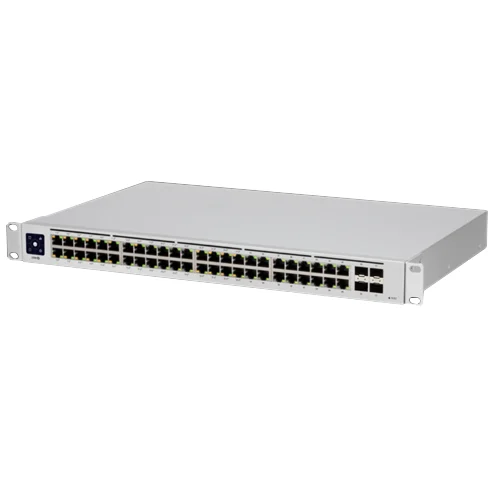
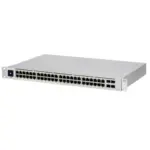
Ubiquiti Standard 48 PoE-USW-48-POE
£556.60 Ex VAT
2 in stock
Payment Methods:
Description
The Ubiquiti USW-48-PoE UniFi 48-Port Cloud Managed Gigabit PoE+ Switch provides Gigabit PoE links to your RJ45 Ethernet devices and Gigabit fibre uplink options to your enterprise network. The USW-48-PoE features a 1.3-inch touch LCM to provide status.
Key Features
- Forty-eight (48) Gigabit Ethernet ports including thirty-two (32) 802.3at PoE+ ports.
- Four (4) 1GbE SFP ports.
- 1.3-inch touch LCM.
- 1U Rackmountable (hardware included).
- Managed by UniFi Controller.
- 210W Power supply.
Fibre Connectivity
The four (4) 1GbE SFP ports enable network uplinks of up to 1 Gbps.
Fanless, Silent Cooling
The UniFi PoE Switch features fanless, silent thermal cooling*, so it can be deployed in areas where fan noise would be distracting.
* Fanless switches must not be stacked.
Switching Performance
The USW-48-PoE UniFi PoE Switch offers the forwarding capacity to simultaneously process traffic on all ports at line rate without any packet loss.
802.3af/at PoE
PoE support simplifies your network infrastructure and cabling. PoE ports offer 802.3af/at to power your PoE devices, such as UniFi APs and cameras.
Innovative Display
The 1.3-inch touchscreen displays status information for easy monitoring and quick troubleshooting.
Scalable UniFi Network Controller
Management Capabilities
The UniFi Network Controller can provision UniFi devices, map out networks, and quickly manage system traffic. Important network details are logically organised for a simplified, yet powerful, interface.
Network Overview
From a single pane of glass, view network topology and configuration, real-time statistics, and debugging metrics. Monitor your network’s vitals and make on-the-fly adjustments as needed.
Deep Packet Inspection
Ubiquiti’s proprietary Deep Packet Inspection (DPI) engine includes the latest application identification signatures to track which applications (and IP addresses) are using the most bandwidth.
Detailed Analytics
The UniFi Network Controller provides configurable reporting and analytics to manage large user populations and expedite troubleshooting. Advanced search and sorting capabilities make network management more efficient.
Multi-Site Management
A single controller running in the cloud can manage multiple sites: multiple, distributed deployments and multi-tenancy for managed service providers. Each site is logically separated and has its own configuration, maps, statistics, guest portal, and administrator accounts.
Switch Configuration
You can access any managed UniFi Switch through the UniFi Controller to configure a variety of features:
- Operation mode (switching, mirroring, or aggregate) per port
- Network/VLAN configuration
- Jumbo frame and flow control services
- Network settings
- Storm control setting per port
- Spanning tree configuration
- 802.1X control and RADIUS VLAN
- Debug terminal option for command-line interface
Switch Port Status
You can also view status information for each port:
- Connection speed and duplex mode
- TX/RX data rates
- Network/VLAN setting
Software Features
The UniFi Network Controller software offers the following features:
- Centralised configuration management (including configuration cloning)
- Auto-MDIX automatically adjusts as needed for straight through or crossover cable
- 802.1X (RADIUS) authentication and dynamic VLAN

Customer Reviews
Description
The Ubiquiti USW-48-PoE UniFi 48-Port Cloud Managed Gigabit PoE+ Switch provides Gigabit PoE links to your RJ45 Ethernet devices and Gigabit fibre uplink options to your enterprise network. The USW-48-PoE features a 1.3-inch touch LCM to provide status.
Key Features
- Forty-eight (48) Gigabit Ethernet ports including thirty-two (32) 802.3at PoE+ ports.
- Four (4) 1GbE SFP ports.
- 1.3-inch touch LCM.
- 1U Rackmountable (hardware included).
- Managed by UniFi Controller.
- 210W Power supply.
Fibre Connectivity
The four (4) 1GbE SFP ports enable network uplinks of up to 1 Gbps.
Fanless, Silent Cooling
The UniFi PoE Switch features fanless, silent thermal cooling*, so it can be deployed in areas where fan noise would be distracting.
* Fanless switches must not be stacked.
Switching Performance
The USW-48-PoE UniFi PoE Switch offers the forwarding capacity to simultaneously process traffic on all ports at line rate without any packet loss.
802.3af/at PoE
PoE support simplifies your network infrastructure and cabling. PoE ports offer 802.3af/at to power your PoE devices, such as UniFi APs and cameras.
Innovative Display
The 1.3-inch touchscreen displays status information for easy monitoring and quick troubleshooting.
Scalable UniFi Network Controller
Management Capabilities
The UniFi Network Controller can provision UniFi devices, map out networks, and quickly manage system traffic. Important network details are logically organised for a simplified, yet powerful, interface.
Network Overview
From a single pane of glass, view network topology and configuration, real-time statistics, and debugging metrics. Monitor your network’s vitals and make on-the-fly adjustments as needed.
Deep Packet Inspection
Ubiquiti’s proprietary Deep Packet Inspection (DPI) engine includes the latest application identification signatures to track which applications (and IP addresses) are using the most bandwidth.
Detailed Analytics
The UniFi Network Controller provides configurable reporting and analytics to manage large user populations and expedite troubleshooting. Advanced search and sorting capabilities make network management more efficient.
Multi-Site Management
A single controller running in the cloud can manage multiple sites: multiple, distributed deployments and multi-tenancy for managed service providers. Each site is logically separated and has its own configuration, maps, statistics, guest portal, and administrator accounts.
Switch Configuration
You can access any managed UniFi Switch through the UniFi Controller to configure a variety of features:
- Operation mode (switching, mirroring, or aggregate) per port
- Network/VLAN configuration
- Jumbo frame and flow control services
- Network settings
- Storm control setting per port
- Spanning tree configuration
- 802.1X control and RADIUS VLAN
- Debug terminal option for command-line interface
Switch Port Status
You can also view status information for each port:
- Connection speed and duplex mode
- TX/RX data rates
- Network/VLAN setting
Software Features
The UniFi Network Controller software offers the following features:
- Centralised configuration management (including configuration cloning)
- Auto-MDIX automatically adjusts as needed for straight through or crossover cable
- 802.1X (RADIUS) authentication and dynamic VLAN

Customer Reviews
Reviews
There are no reviews yet.
Related Products
Ubiquiti NanoBeam 5AC Gen 2 Network bridge 450 Mbit/s White-NBE-5AC-GEN2
10 in stock
£79.00 Ex VAT

Reviews
There are no reviews yet.